Creating and modifying scripted elements from scripts (deprecated)
Warning
The scripted elements API is deprecated and will be removed in the next ZEISS INSPECT version. Please use the new Extensions API instead.
Non-interactive creation
You use the command gom.script.sys.create_element_by_script() to create a scripted element from a script without opening its dialog. This example uses a scripted actual distance:
create_distance.py
import gom

# Create scripted distance using ex01_distance.py
element = gom.script.sys.create_element_by_script (
    check_type = 'none',
    element_type = 'distance',
    name = 'Distance 1',
    parameters = {
        'p1_x': 10.0, 'p1_y':  2.0, 'p1_z':  3.0,
        'p2_x': -1.0, 'p2_y': -2.0, 'p2_z': -3.0
    },
    script_uuid = '06a112da-b742-48f0-80b3-3c3893f4cc8a'
)
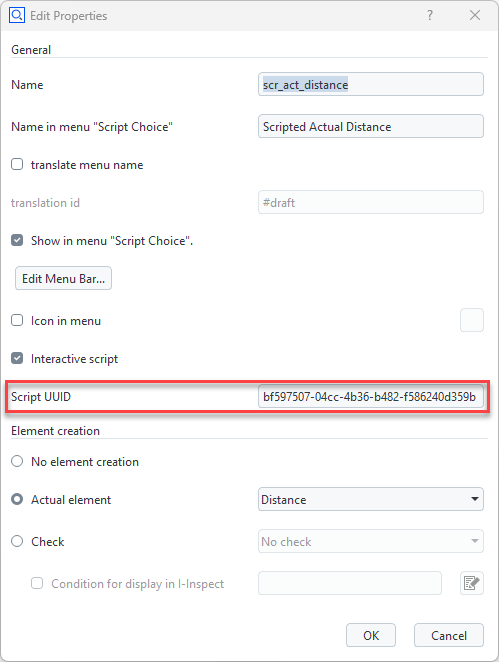
You get the script_uuid from the scripted element’s script properties:
This functionality is also used in the Python API Examples App’s script tests.
Non-interactive modification
You modify an element interactively using RMB ► Edit Creation Parameters in the Explorer. You achieve the same from a script with the command gom.script.sys.edit_creation_parameters(). To disable invocation of the dialog, the parameter nodialog has been added:
modify_distance.py
import gom

# Modify scripted element created with ex01_distance.py
gom.script.sys.edit_creation_parameters (
    element = gom.app.project.actual_elements['Distance 1'],
    parameters = {
      'p1_x': -10.0, 'p1_y':  2.0, 'p1_z':  3.0,
      'p2_x':  -1.0, 'p2_y': -2.0, 'p2_z': -3.0,
      'nodialog': True},
)
Scripted element Python source code
def dialog(context, params):
    if 'nodialog' in params and params['nodialog']:
        params['nodialog'] = False
        return params

    # ...